> ## Documentation Index
> Fetch the complete documentation index at: https://pipedream.com/docs/llms.txt
> Use this file to discover all available pages before exploring further.
# OAuth Clients
When connecting an account for any OAuth app via Pipedream Connect, we’ll default to using Pipedream’s official OAuth client, which enables you to quickly get up and running. [Read more about OAuth clients in Pipedream here](/apps/oauth-clients/).
## Using Pipedream OAuth
There are two types of apps in Pipedream:
1. **Key-based**: These apps require static credentials, like API keys. Pipedream stores these credentials securely and exposes them via API.
2. **OAuth**: These apps require OAuth authorization. Pipedream manages the OAuth flow for these apps, ensuring you always have a fresh access token for requests.
For any OAuth app that supports it, **you can always use your own client.** Your ability to use Pipedream’s OAuth clients in production depends on the use case. See below for details.
| Operation | Details | Pipedream | Custom |
| ------------------------- | ----------------------------------------------------------------------------------------------------------------------- | --------- | ------ |
| Retrieve user credentials | [Fetch the credentials](/connect/api-reference/list-accounts) for your end user from Pipedream’s API to use in your app | ❌ | ✅ |
| Invoke workflows | [Trigger any Pipedream workflow](/connect/workflows/) and use the connected account of your end users | ❌ | ✅ |
| Embed prebuilt tools | [Run any action and deploy any trigger](/connect/components/) directly from your AI agent or app | ✅ | ✅ |
| Proxy API requests | [Write custom code to interface with any integrated API](/connect/api-proxy/) while avoiding dealing with user auth | ✅ | ✅ |
## Using a custom OAuth client
1. Follow the steps [here](/apps/oauth-clients/#configuring-custom-oauth-clients) to create an OAuth client in Pipedream.
2. When connecting an account either via the [frontend SDK](/connect/managed-auth/quickstart/#use-the-pipedream-sdk-in-your-frontend), make sure to include the `oauthAppId` in `pd.connectAccount()`.
3. If using [Connect Link](/connect/managed-auth/quickstart/#or-use-connect-link), make sure to include the `oauthAppId` in the URL.
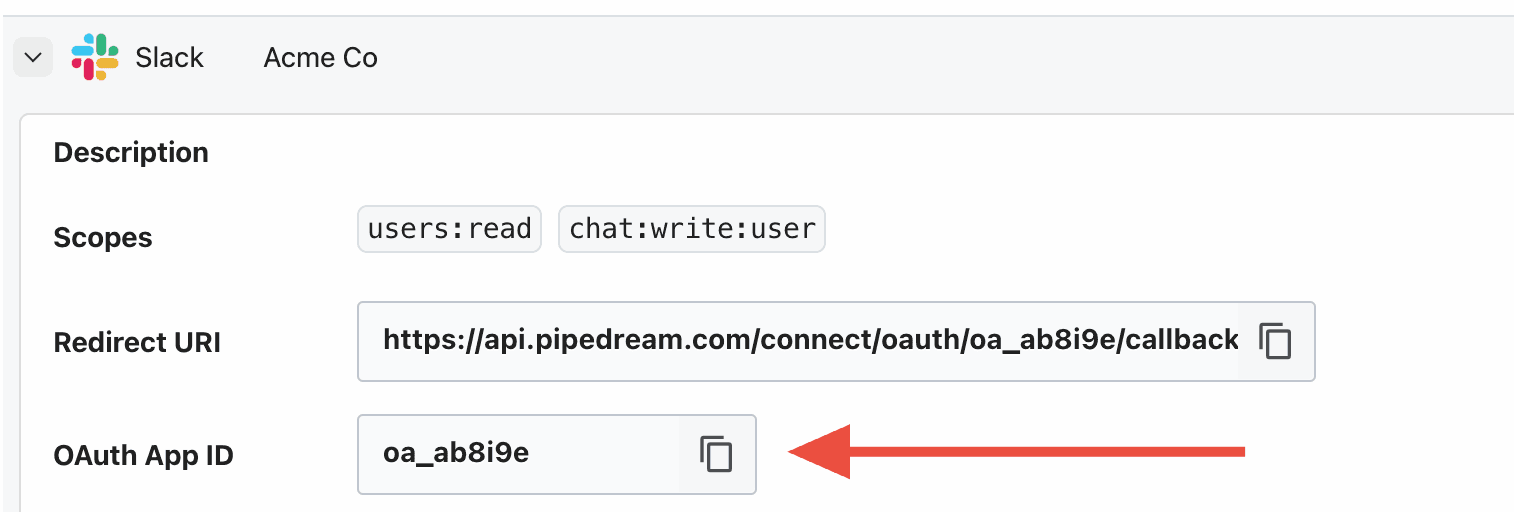
### Finding your OAuth app ID
[Create your OAuth client in Pipedream](https://pipedream.com/@/accounts/oauth-clients) then click the arrow to the left of the client name to expand the details.