> ## Documentation Index
> Fetch the complete documentation index at: https://pipedream.com/docs/llms.txt
> Use this file to discover all available pages before exploring further.
# Delay
export const DELAY_MIN_MAX_TIME = 'You can pause your workflow for as little as one millisecond, or as long as one year';
### Delay
Sometimes you need to wait a specific amount of time before the next step of your workflow proceeds. Pipedream supports this in one of two ways:
1. The built-in **Delay** actions
2. The `$.flow.delay` function in Node.js
{DELAY_MIN_MAX_TIME}. For example, we at Pipedream use this functionality to delay welcome emails to our customers until they’ve had a chance to use the product.
#### Delay actions
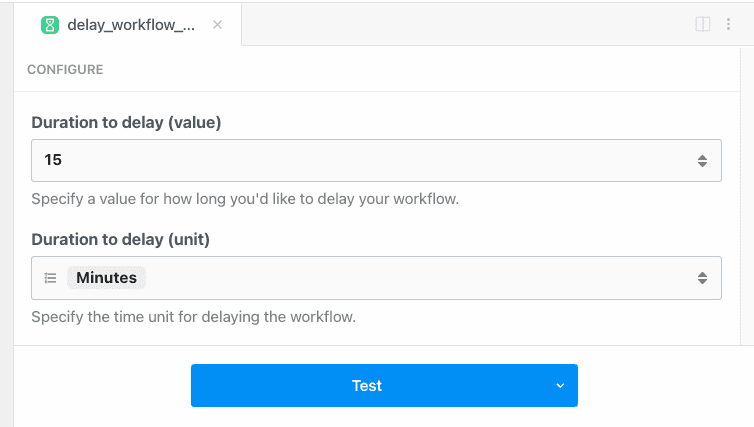
You can pause your workflow without writing code using the **Delay** actions:
1. Click the **+** button below any step
2. Search for the **Delay** app
3. Select the **Delay Workflow** action
4. Configure the action to delay any amount of time, up to one year
#### `$.flow.delay`
If you need to delay a workflow within Node.js code, or you need detailed control over how delays occur, [see the docs on `$.flow.delay`](/workflows/building-workflows/code/nodejs/delay/).
#### The state of delayed executions
Delayed executions can hold one of three states:
* **Paused**: The execution is within the delay window, and the workflow is still paused
* **Resumed**: The workflow has been resumed at the end of its delay window automatically, or resumed manually
* **Cancelled**: The execution was cancelled manually
You’ll see the current state of an execution by [viewing its event data](/workflows/building-workflows/inspect/).
#### Cancelling or resuming execution manually
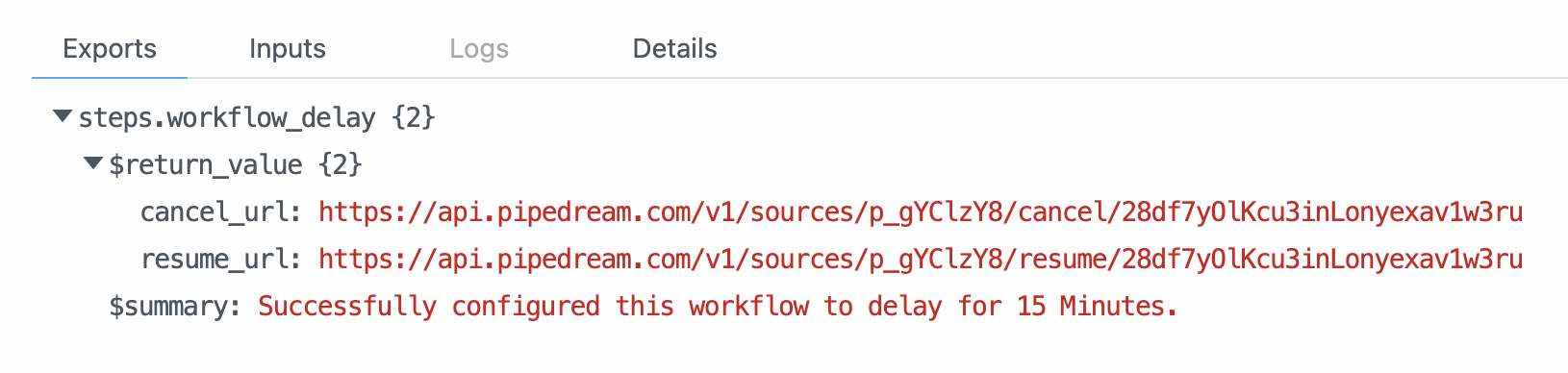
The [**Delay** actions](/workflows/building-workflows/control-flow/delay/#delay-actions) and [`$.flow.delay`](/workflows/building-workflows/code/nodejs/delay/) return two URLs each time they run:
These URLs are specific to a single execution of your workflow. While the workflow is paused, you can load these in your browser or send an HTTP request to either:
* Hitting the `cancel_url` will immediately cancel that execution
* Hitting the `resume_url` will immediately resume that execution early
If you use [`$.flow.delay`](/workflows/building-workflows/code/nodejs/delay/), you can send these URLs to your own system to handle cancellation / resumption. You can even email your customers to let them cancel / resume workflows that run on their behalf.
 #### `$.flow.delay`
If you need to delay a workflow within Node.js code, or you need detailed control over how delays occur, [see the docs on `$.flow.delay`](/workflows/building-workflows/code/nodejs/delay/).
#### The state of delayed executions
Delayed executions can hold one of three states:
* **Paused**: The execution is within the delay window, and the workflow is still paused
* **Resumed**: The workflow has been resumed at the end of its delay window automatically, or resumed manually
* **Cancelled**: The execution was cancelled manually
You’ll see the current state of an execution by [viewing its event data](/workflows/building-workflows/inspect/).
#### Cancelling or resuming execution manually
The [**Delay** actions](/workflows/building-workflows/control-flow/delay/#delay-actions) and [`$.flow.delay`](/workflows/building-workflows/code/nodejs/delay/) return two URLs each time they run:
#### `$.flow.delay`
If you need to delay a workflow within Node.js code, or you need detailed control over how delays occur, [see the docs on `$.flow.delay`](/workflows/building-workflows/code/nodejs/delay/).
#### The state of delayed executions
Delayed executions can hold one of three states:
* **Paused**: The execution is within the delay window, and the workflow is still paused
* **Resumed**: The workflow has been resumed at the end of its delay window automatically, or resumed manually
* **Cancelled**: The execution was cancelled manually
You’ll see the current state of an execution by [viewing its event data](/workflows/building-workflows/inspect/).
#### Cancelling or resuming execution manually
The [**Delay** actions](/workflows/building-workflows/control-flow/delay/#delay-actions) and [`$.flow.delay`](/workflows/building-workflows/code/nodejs/delay/) return two URLs each time they run:
 These URLs are specific to a single execution of your workflow. While the workflow is paused, you can load these in your browser or send an HTTP request to either:
* Hitting the `cancel_url` will immediately cancel that execution
* Hitting the `resume_url` will immediately resume that execution early
If you use [`$.flow.delay`](/workflows/building-workflows/code/nodejs/delay/), you can send these URLs to your own system to handle cancellation / resumption. You can even email your customers to let them cancel / resume workflows that run on their behalf.
These URLs are specific to a single execution of your workflow. While the workflow is paused, you can load these in your browser or send an HTTP request to either:
* Hitting the `cancel_url` will immediately cancel that execution
* Hitting the `resume_url` will immediately resume that execution early
If you use [`$.flow.delay`](/workflows/building-workflows/code/nodejs/delay/), you can send these URLs to your own system to handle cancellation / resumption. You can even email your customers to let them cancel / resume workflows that run on their behalf.